Some say you should start by focusing on clicks to gather data. The thinking is that until you’ve had some conversions Google won’t know how to optimise for them.
Others say that you should start as you mean to go on and use a conversion-based bidding strategy from day one.
And then it gets even muddier: max clicks or manual CPC, maximise conversions or set a target CPA?
The result is that launching a new Google Ads account comes with a side order of dread. Will the ads serve? Will we get conversions? Will we burn the budget on irrelevant clicks?
It’s even worse when the client has huge expectations and a budget tighter than a fish’s bottom.
I’ve launched hundreds of new campaigns. The anxiety never goes away. Refresh the dashboard. Refresh again. And again. Worry until the first lead arrives. Exuberant high-fives with my long-suffering wife. Then the worry comes back: what if we never get another lead?
Managing Google Ads would be a lot less stressful if there was a predictable launch process. Something that said: if you do this, this and this, you’ll get this, this and this.
There isn’t. But I’ll share with you what’s worked for me in the last year or so.
Just to be clear, I’m not trying to declare the one true way here. I’m sharing my approach. If you’ve got something that works for you, stick with it.
Do you need your own conversion data?
The advice to start with clicks comes from the assumption that Google needs enough conversion data in your account for Smart Bidding to work.
I don’t have evidence one way or the other, but to me it feels like Smart Bidding doesn’t start from zero anymore. My working assumption is that the model comes pre-trained on system-wide data.
That doesn’t mean your data is irrelevant. Smart Bidding absolutely improves as it receives your conversion feedback. But it looks like you don’t need thousands of clicks in your account for Google to know which are likely to convert.
So rather than starting with clicks, I start with conversions. But, in a tightly controlled structure. I’ll tell you about that in a minute, but first, here’s actual data from a recent launch.
The highlights
I launched this account using conversion-based bidding from day one.
In the first 11 days:
- First lead arrived on day 1
- Leads generated: 45
- Average CPA: $101 against a $100 target
- Conversion rate: 13%
Performance stabilised after 6 days, without a preliminary click-gathering phase.
Some context
- In the last 14 months I’ve launched only 12 brand new accounts. This is a small sample size.
- I only use Google Ads for lead generation. I don’t know if this will work for e-commerce or SaaS.
- This campaign is for an immigration consultant. I’ve done a lot of work in the industry so I had a feel for what the cost per lead was likely to be before the campaign started. I would have had to set the target CPA higher if I wasn’t familiar with the field.
- This is a pilot campaign. The goal is to see if Google can deliver the right kinds of leads at a cost per lead that makes sense. At this stage it’s not about scale or reducing CPA. It’s just a test for fit.
Campaign structure
Targeting
- Location. United States. Targeting people in, rather than people interested in the location.
- Networks. Search only. Search partners and Display are disabled because they usually produce junk. We’ll test these later if we need to scale.
- Ad schedule. Office hours only. We’re probably paying more per lead, but it ensures rapid response which materially improves sales.
- Keywords. Ideally we’d only target solution-aware keywords, but there isn’t enough search volume in these so we’ve included problem-aware keywords. I’ve used a mix of exact and broad match types in each ad group. More on this in the end notes.
- Negative keywords. I got a standard list that includes things like job, jobs, pdf etc. I added negatives found during keyword research and from the search terms report.
Ad groups
Although this is one service, people search for it using five different phrases. We’ve got one ad group for each pattern.
Ad copy
The offer is a free assessment, which is standard in this industry. I pinned that in the headline.
Because this is a regulated industry, certain phrases must appear. These are also pinned to guarantee compliance.
Ad strength is marked “poor” due to pinning. In practice, this is fine as ad strength isn’t the campaign’s goal.
Landing page
This campaign drives traffic to a single landing page. It’s built on my in-house landing page system. The system produces pages that load in under a second, are easy to use on mobile and generally convert well.
Bidding and budget
I used the portfolio Maximise Conversions bidding strategy with a target CPA set.
The portfolio version allows me to cap maximum CPC. This is important with new or low-volume campaigns because it stops the algorithm from making wild bids. (I still carry the scars from paying $2500 for 5 clicks in a $25/click campaign).
I set the target CPA roughly 20% above where I expect it to settle long-term. That gives the system room to explore.
The daily budget was set to 5x the target CPA. In my experience, much less than this and the campaign just doesn’t get going.
In this case the daily budget worked out ok with what the client wanted to spend in a month. But, if it was much more I’d still have set a high daily budget and paused the campaign when we hit the client’s spend limit.
Starving a campaign with too small a daily budget often prevents it from entering auctions properly. I’d rather let it run and pause it when needed.
Conversion tracking
The landing page offers two contact methods: form and phone.
Both are tracked as conversions using Litiro.com. This allows for a clean signal without spam or duplicates muddying the water.
We also track qualified and converted leads as offline conversions in the same system. We’re not using these as primary conversions yet, but they allow for fast feedback on lead quality.
Transparency note: I built and own Litiro, the system used here for data quality. But it doesn’t matter how you track conversions as long as you’re feeding clean data to Google.
I hope this has been useful. It’s not perfectly predictable. But it’s predictable enough that I don’t feel blind on day one anymore.
I’ve put the day-by-day performance and some more detailed notes next.
Results by day
For clarity I’ve removed weekends when the ads weren’t showing.
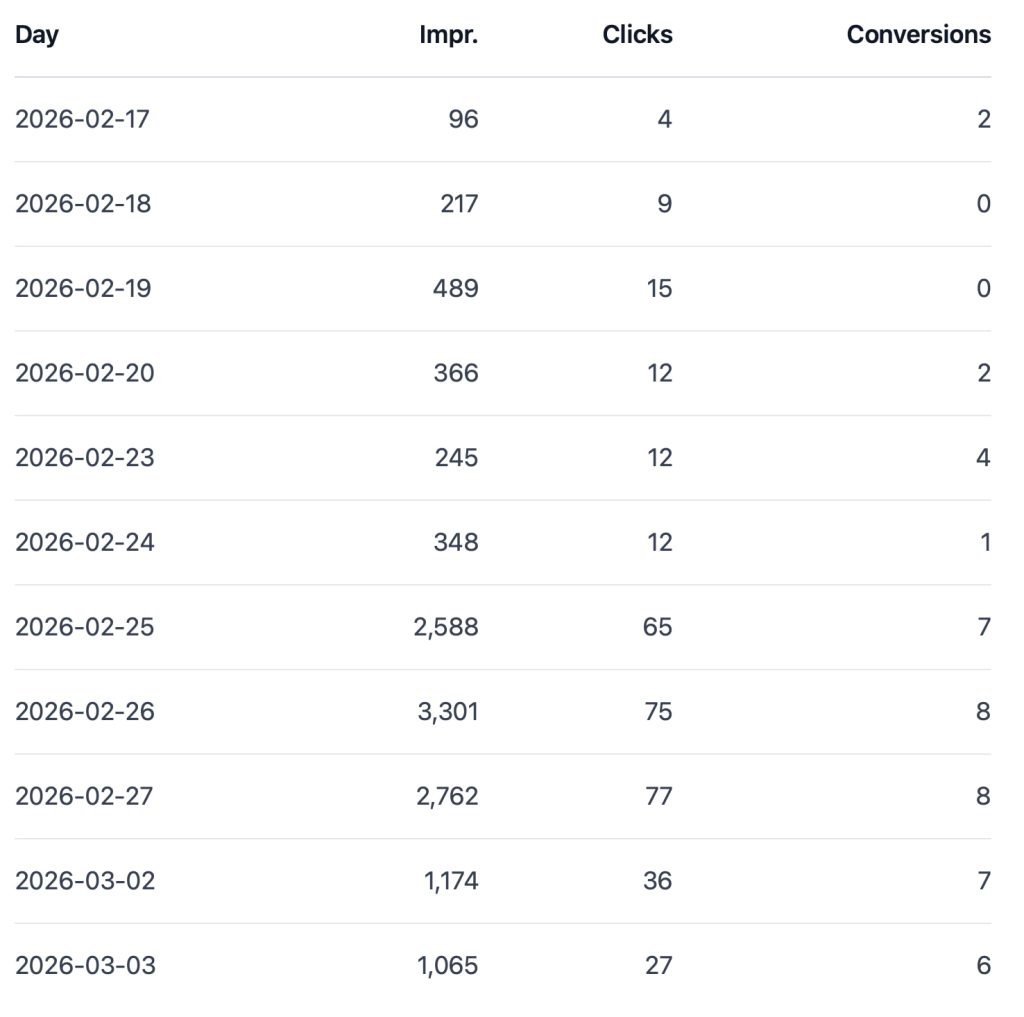
The last day’s data and period after this isn’t representative of the launch phase because we reduced the budget from $500/day to $200/day to stay within the monthly limit.
Notes
The difference between problem-aware and solution-aware searches
Problem-aware searches come from people who know they have a problem but haven’t yet decided how to solve it. Someone searching for “causes of knee pain” is problem-aware. They haven’t decided if they’re going to solve the problem with medication, exercises, a brace or if they’re going to get help from a doctor, physio, acupuncturist etc.
Solution-aware searches come from people who have already decided how they want to solve the problem. Someone searching for “physiotherapist for knee pain” is solution-aware.
Solution-aware traffic typically converts faster and at higher rates. The challenge is volume. In smaller niches, there might not be enough solution-aware searches so you have to target problem-aware keywords too.
Using a mix of broad and exact match keywords in the same ad group
People have strong feelings on this. I don’t know if they’re right or wrong, but here’s what works for me.
I put a bunch of exact match keywords and one broad match keyword into each ad group. The exact match keywords are there to tell the algorithm what we’re interested in, to set the theme for the ad group. The broad match keyword gets most of the traffic.
In the past I used only exact match searches to start a campaign. I’d expand the match type very cautiously. But, in the last year or so, this hasn’t worked. Exact match only campaigns haven’t got many impressions. They only got going after adding a broad match keyword to each ad group.
I wouldn’t pair broad match and click-based bidding, that’d optimise for cheap junk, but with conversion-based bidding it seems OK.
Why I didn’t use a call asset
Google allows you to add a click-to-call button directly in the ad so users can call without visiting the landing page. In practice this results in a lot of calls for other businesses that don’t end up becoming customers.
Conclusion
Launching a new Google Ads account will probably always come with some anxiety — that’s just the nature of the job. But with the right structure, conversion-based bidding from day one, clean tracking, and a budget that actually gives the algorithm room to breathe, you can replace blind hope with something closer to informed confidence.
No launch process is perfectly predictable, but if you control what you can control — tight targeting, a strong landing page, a realistic CPA target — you give yourself the best possible chance of seeing that first lead arrive on day one. And maybe, just maybe, fewer frantic dashboard refreshes.